Engraving Marking Paper For Laser
$ 2.20
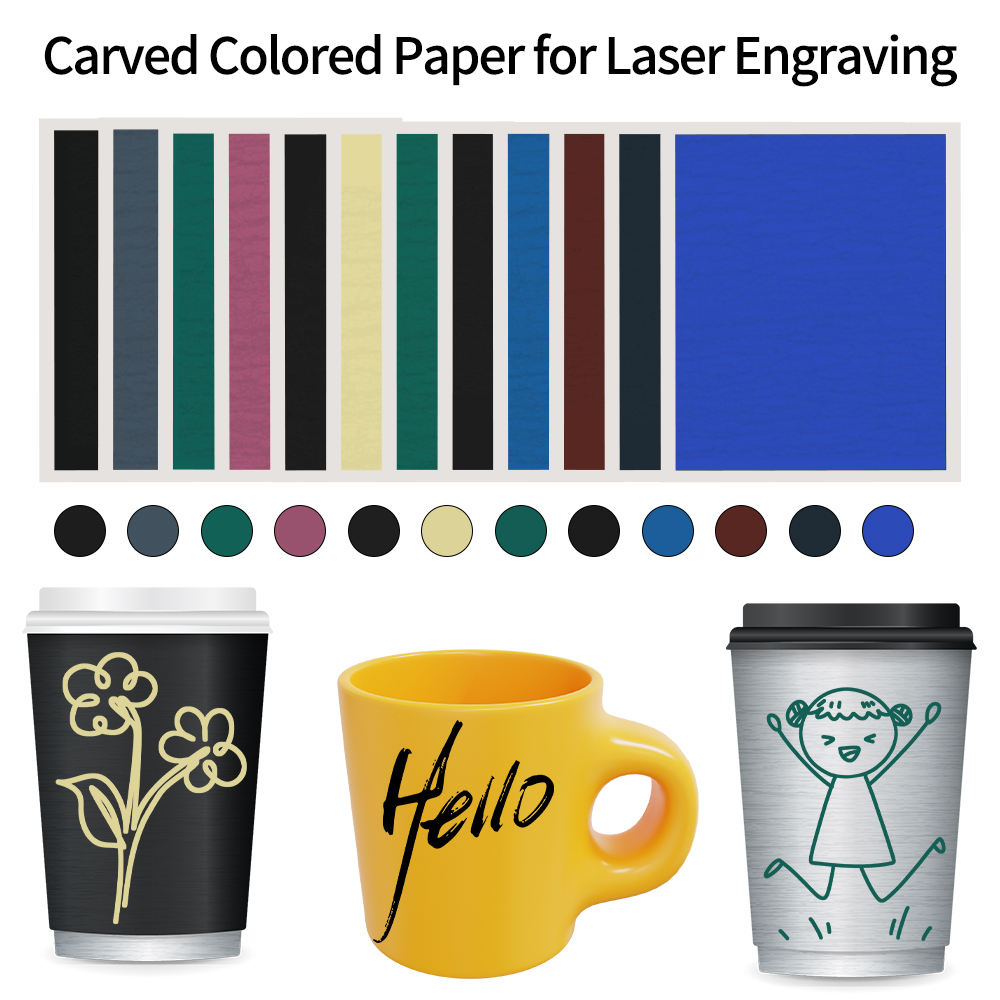
Description 12 Colors Carving Paper Compatible with CO2 Fiber Semi-conductor UV Laser Marking Engraving Machine Material Ceramic Glass Stone Compatibility Compatible with almost of laser engravers, like CO2 Laser Engraver Machine Fiber Laser Engraver Machine UV Laser Marking Machine Diode/ Semiconductor Laser Attention please, it cannot be used on any metal surface, like aluminum, stainless steel, iron etc. Some colors may be changed after laser engraving, so the paper color looks like different from the true color, we will remark ture color on the back, please subject to marked color. Step 1: Distinguish the Front Side The color upward for the front, when sticked need to keep the front upward. Step 2: Cutting Color Paper Cut the right size according to the content of the engraving. Step 3: Soaking Color Paper Put the cut color paper into water and wet it for 1-2 minutes. Peel the colored paper from the backing after soaking. Step 4: Stick on the Object Please keep the front upward and use a scraper to remove air bubbles and creases. It is necessary to buy a scraper together. Please dry the colored paper with hair dryer before engraving. Step 5: Prepare to Engrave Place the object on the engraving machine and select the engraving pattern. Pay attention to the direction of the pattern, you may need to flip the pattern if engrave it horizontally. Step 6: Start Engraving Waiting for the engraving process to be completed. Step 7: Soaking Color Paper Soak in water for 5 minutes after the engraving is completed. Full soaking helps to peel off excess colored paper easily. Step 8: Remove Excess Color Paper Take out the soaked object and remove the excess color paper patiently. Step 9: Product Display DIY as you like.
Description
Slate
Aluminum
Crystal
Additional information
| Striking Surface | Slate, Aluminum, Crystal, Copper, Glass |
|---|
Related products
-
Silicone Mold Former Kit
$ 12.44 -
Large Masking Tape 30cm
$ 10.04